
Integrity Insure Client App
Install once. Keep support in your pocket.
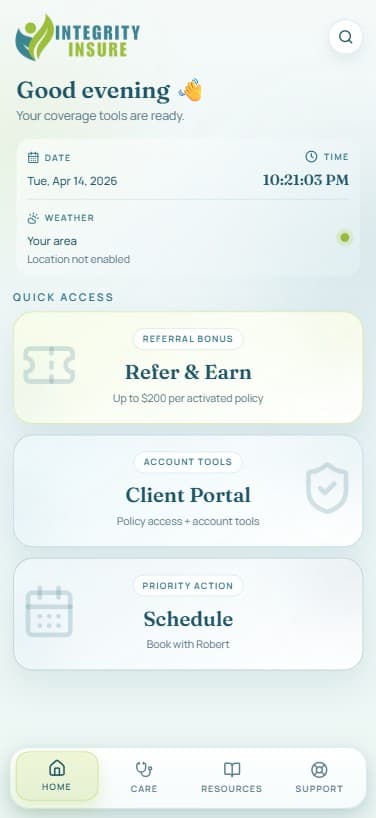
This is your client command center: Home, Care, Resources, and Support in a single app icon. Open it any time for schedule booking, support messaging, referral rewards, FAQ search, and policy tools.
Most-used tools
What’s inside
What’s new in the app, beyond install.
The mobile dashboard now includes deeper tools, cleaner organization, and support-first workflows. It’s a full in-app client experience, not a lightweight link page.
4-hub upgraded dashboard
A full mobile redesign with focused Home, Care, Resources, and Support hubs built for active clients.
Care tools in one place
Telehealth, doctor lookup, prescription savings, and procedure-cost tools now grouped and easier to navigate.
Unified search + FAQ answers
Search tools and common insurance questions directly in the app with expanded FAQ support.
In-app scheduling flow
Book appointments inside the app with an embedded scheduling experience built for quick action.
Support message form
Send support requests directly inside the app, with call/text/email backup options when needed.
Refer & earn built-in
Referral flow is now native to the app with a dedicated form and bonus tracking path.
Support-first experience
Support tab now prioritizes scheduling and messaging first, with faster in-app escalation paths.
Secure access + portal links
Quick launch to client portal plus app-gated access that keeps the installed experience streamlined.
Why not an App Store app?
Faster to install. Free forever. Works the same.
PWA shortcuts install directly from your browser in seconds — no App Store, no Play Store, no approval wait, no storage bloat. You get a native-feeling app icon on your home screen that opens a full-screen, mobile-optimized dashboard.
- Installs in under 30 seconds
- No App Store account required
- Works on iPhone, Android, and tablet
- Always fully up to date — no manual updates
- Includes in-app schedule, support, and referral workflows
- Free to install, free to use
Traditional App Store App
Download, wait, update manually, take up storage
Integrity Insure PWA
30-second browser install, always current, zero storage
Get the app
Install in under 30 seconds
On your phone
Install directly from this page
Open this page on your phone
Visit integrityhealth.care/app in Safari (iPhone) or Chrome (Android).
Add to Home Screen
iPhone: tap the Share icon → Add to Home Screen. Android: tap the menu (⋮) → Install app or Add to Home Screen.
Launch from your home screen
Open from your home screen icon to access the upgraded in-app dashboard and tools.
Ready to install?
Tap below to add the Integrity Insure app to your home screen.
Use browser menu and choose Install app or Add to Home Screen.
On your desktop
Scan with your phone camera
Open your phone camera, point it at the code below, and it will take you directly to this install page on your phone. From there the install takes under 30 seconds.
- 01Open your phone camera app
- 02Point at the QR code
- 03Tap the link that appears
- 04Follow the phone install steps
Ready to get started?
Your coverage tools are one shortcut away.
Free. No App Store. No account required. Already a client and have questions? Robert is one message away.